

Warmup
Manage profiles
Add people to Warmup, set who likes their posts, and remove them.
Profiles are the people Warmup engages with. Workspace settings apply to everyone unless you override them on one profile.
Add a profile
- Click Warmup in the left sidebar.
- Click Add profile.
- In Add Leads, pick a source. From Existing List is first when you already have a list.
The other sources match adding leads to a list: LinkedIn Profile, LinkedIn Resolver, CSV File, Post Engagers, LinkedIn Search, Sales Nav Search, and Account Employees. HubSpot CRM and Pipedrive CRM appear when those integrations are connected.
The list columns are Name, Source, Headline, Company, Activity, Sender, and Added.
Workspace settings
- Click Settings.
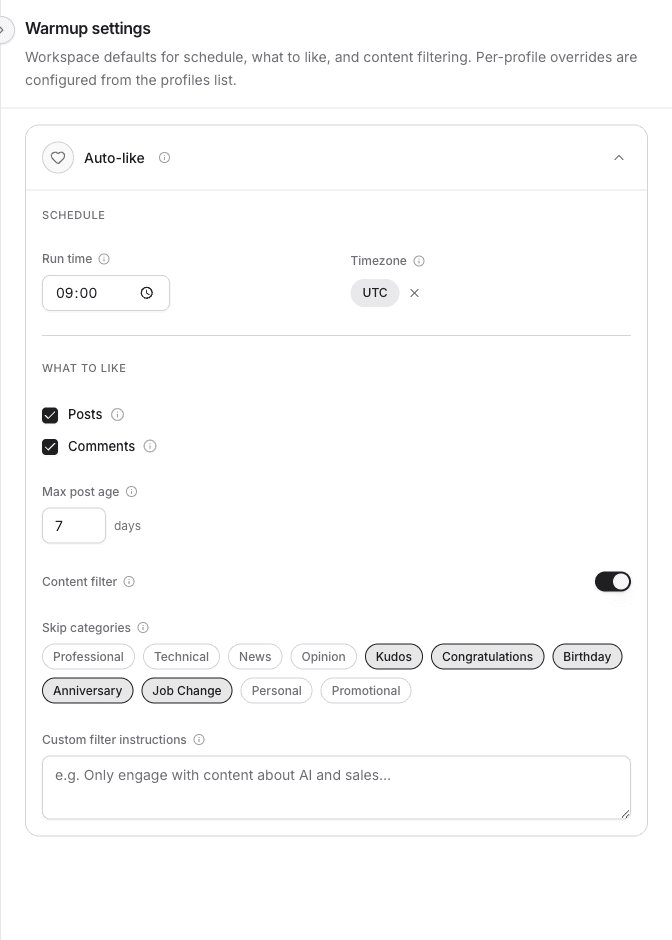
- In Warmup settings, open Auto-like.
| Setting | What it does |
|---|---|
| Run time | When Warmup checks for new posts and comments each day. |
| Timezone | The timezone that run time uses. |
| Posts | Like posts from warmed profiles. |
| Comments | Like comments from warmed profiles. |
| Max post age | Only like posts and comments newer than this many days. |
| Content filter | Skip categories such as Kudos, Birthday, and Job Change. |
| Custom filter instructions | Extra instructions for that filter. |
Changes save as you edit them.
One profile
Right-click a profile.
- Click Warmup settings.
- Pick a Sending account. Likes for this person go out from that LinkedIn account.
- Turn on Override workspace settings to give this profile its own schedule and content rules.
Open lead opens the person. Delete removes them from Warmup. The confirm dialog is Remove this profile?